For newsrooms
Check the location before the story runs.
A photo arrives with a place name attached. Compare that claim with the location suggested by WYSS TERRA, inspect the clues marked on the photo and share the findings with your editor.
Example: a photo captioned “South Bank, London”
This is a real published analysis, run without GPS data: a bicycle by a river, no place name in the picture. Imagine it arrived with the caption “South Bank, London”.
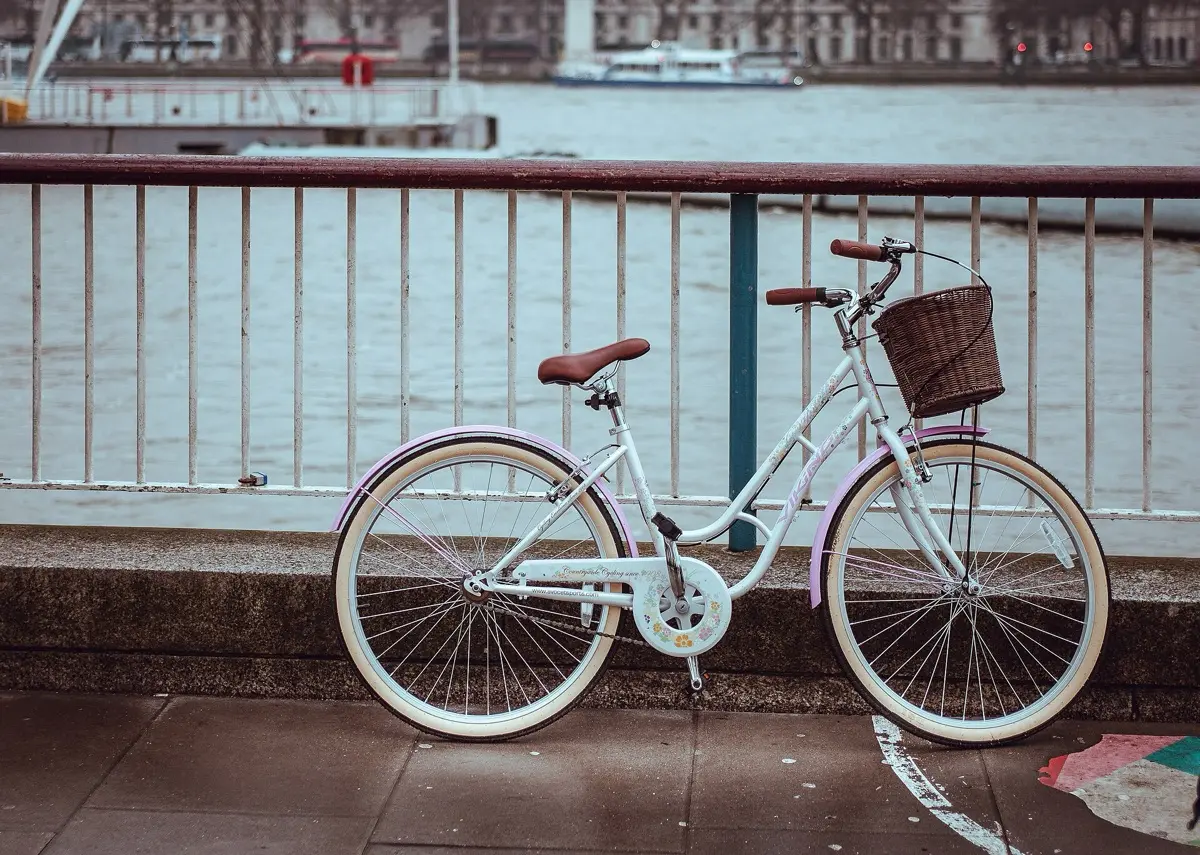
Sample case
What you get back
- Location
- South Bank, Queen's Walk, London, United Kingdom
- Distance to camera location
- 383 m
- Search radius
- 400 m
- Review by VERIFIER
- Confirmed
- 1White angled struts at top left resembling the London Eye A-frame legs, with a pier/pontoon below
- 2Red double-decker buses on the far embankment road
- 3Wide grey-brown tidal river consistent with the Thames
- 4Riverside railing with maroon handrail, white balusters and teal posts on a granite plinth, as on the Queen's Walk
Download the sample case file (PDF) ↓Open the full analysis →
Real analysis without GPS data, 20 November 2026. Photo: Wikimedia Commons (CC0)
How a desk uses it
- 01
Take the photo and the claim
A reader photo, a social media post or agency material: note the place it is said to show and upload the original file.
- 02
Run the analysis
If the file still has GPS data, LOCATE uses it. If not, WYSS TERRA LOCATOR reads the scene and VERIFIER checks the estimate. Usually 20 to 40 seconds.
- 03
Compare result and claim
Does the suggested location, with its radius, match the caption? Which marked clues support it, and which point elsewhere?
- 04
Document and share
Send the result link or the PDF case file to your editor, and continue with maps, street imagery and your own sources.
What the check covers
Turn the photo into a location lead your desk can check. Inspect the marked details, compare the estimate with maps and independent sources, and keep the findings in the case file. Check the date, source and editing separately.
In our test of 100 outdoor photos, 96 were placed within 25 km and half within 422 m of where they were taken.
What it costs
One credit is one photo analysis. A single check costs €5.90, without a subscription, and credits never expire. Desks that check photos every day take 50 credits for €199 (€3.98 each) or 100 for €349 (€3.49 each). Organisations can buy from 300 credits on invoice, price on request.
Questions from newsrooms
- Can we share a result with colleagues?
- Yes. Every result can be shared via a link and downloaded as a PDF case file; for an image analysis it also contains the marked clues and the review note.
- Does it work with photos from messaging apps?
- Yes. Messaging apps usually remove the GPS data; LOCATE then reads the place from the picture itself.
- Can we connect it to our own tools?
- Yes. The API sends back the same result as JSON and uses the same credits as the web app. API for developers
- What if a photo cannot be analysed?
- If an analysis fails or the image cannot be analysed, the credit is returned automatically.
- The photo shows a shop name or a street sign. Can you check the exact address?
- Yes, with a deep analysis for 4 more credits. It is offered when the photo holds suitable leads, for example readable lettering. WYSS TERRA follows such a lead, for example a shop name, to the places it could belong to, checks each one against the photo and against sources, and rules out those that do not fit. After about 2 minutes you get a narrower location with the sources it rests on and what stays unconfirmed. In our test of 19 photos with a legible business name, 12 deep analyses ended within 66 m of the reference position (the camera position, or the shop's address for 2 photos). No narrower location backed by sources? You get the 4 credits back.Real case: a bakery in Teufen, from 5.9 km to 22 m →Sample report with deep analysis (PDF) ↓
- Can we publish the result?
- Yes. You may show results and PDF case files in published work and pass them to clients, as long as LOCATE.photo is named as the source, for example “Location analysis: LOCATE.photo”.
- Are our photos used for training?
- No. Uploaded photos are used only for your own analysis. They stay in your account until you delete it.